
KMind v2.13.3 Epic Update: Support Dragging SiYuan Blocks Directly into the Map & Global Shortcuts
Description: This version supports dragging SiYuan documents and blocks directly into the map, and allows configuring global shortcuts that apply to all KMind assets.
New Features:
Support dragging SiYuan documents directly into the map. If dropped on a blank area, a new root node is created with the document name. If dropped on a node, the node's SiYuan hyperlink is updated.


Support dragging SiYuan blocks directly into the map. Hold Shift to create a child node and render it as a SiYuan block, otherwise a SiYuan block area is created directly in the map.
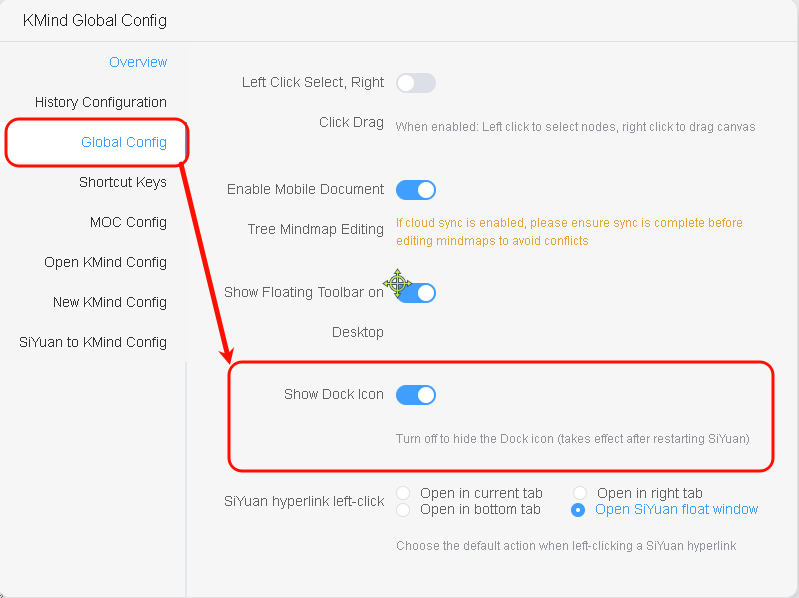
Added KMind Dock icon visibility configuration. Quick start: Top-right KMind Global Config -> Global Config -> Show Dock Icon
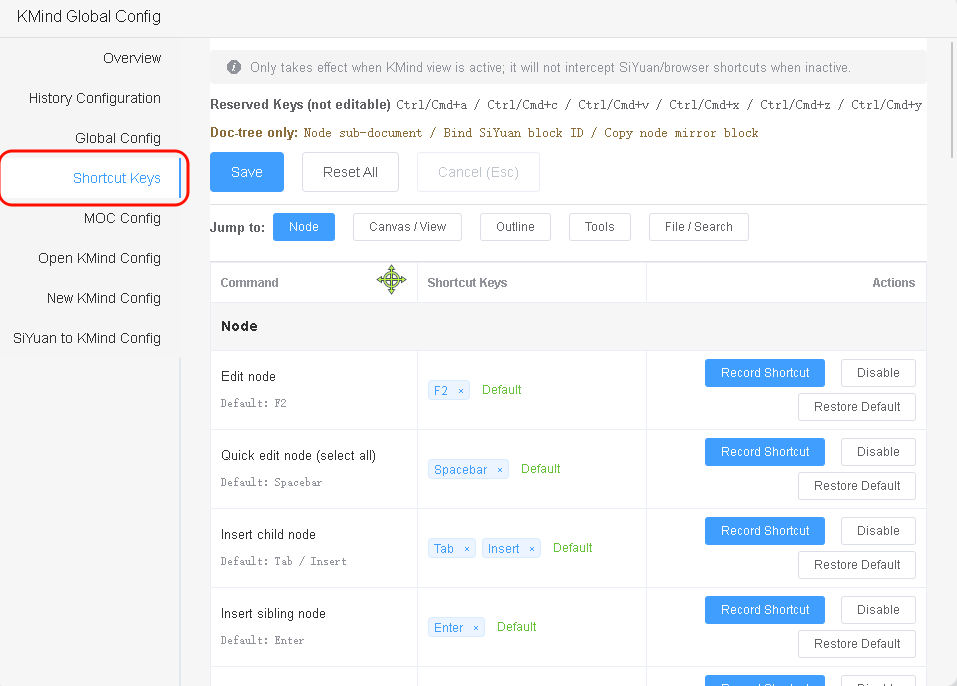
Added built-in shortcuts, ready to use out of the box, including Zen mode, hyperlinks, etc. Shortcuts can be freely configured and take effect immediately after saving. Quick start: Top-right KMind Global Config -> Shortcut Keys
Fixes & Optimizations:
- Fixed blank outline expansion in multi-root mode
- Fixed import/export issues with some files in multi-root mode
- Optimized console debugger output when switching tabs & opening maps without history versions
- Shortcut hints in the map now sync when global shortcuts are modified